Handling CSS-in-JS Style Conflicts
A component library built with @emotion/css was repeatedly getting its styles overridden when integrated into a project that used multiple tech stacks.
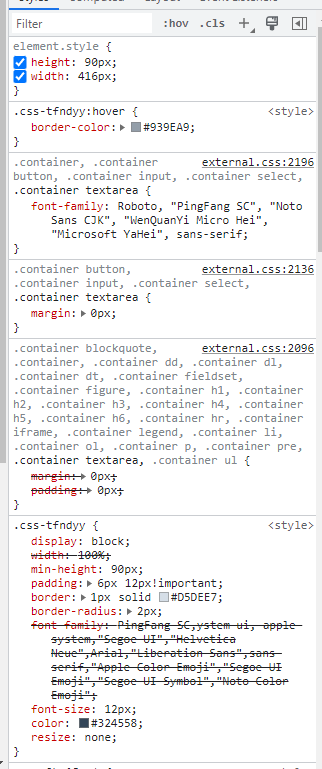
As you can see in the screenshot, the component's styles are being overridden by styles defined in a css file imported by the host project. The root cause: the css-[hash] class selectors generated by CSS-in-JS have relatively low specificity.
According to the Calculating a selector's specificity section of Selectors Level 3:
/* count the number of ID selectors in the selector (= a) */
/* count the number of class selectors, attributes selectors, and pseudo-classes in the selector (= b) */
/* count the number of type selectors and pseudo-elements in the selector (= c) */
/* ignore the universal selector */

Examples:

*               /* a=0 b=0 c=0 -> specificity =   0 */
LI              /* a=0 b=0 c=1 -> specificity =   1 */
UL LI           /* a=0 b=0 c=2 -> specificity =   2 */
UL OL+LI        /* a=0 b=0 c=3 -> specificity =   3 */
H1 + *[REL=up]  /* a=0 b=1 c=1 -> specificity =  11 */
UL OL LI.red    /* a=0 b=1 c=3 -> specificity =  13 */
LI.red.level    /* a=0 b=2 c=1 -> specificity =  21 */
#x34y           /* a=1 b=0 c=0 -> specificity = 100 */
#s12:not(FOO)   /* a=1 b=0 c=1 -> specificity = 101 */

div[data-tag="some-tag-name"] input                      /* a=0 b=1 c=2 -> specificity =   12 */
input[type="text"]                                       /* a=0 b=1 c=1 -> specificity =  11 */
.css-1t321tv                                             /* a=0 b=1 c=0 -> specificity =   10 */
The obvious fix would be adding !important to every conflicting rule, but that's a maintenance nightmare. A more elegant solution follows from a note in the same spec:
Note: Repeated occurrences of the same simple selector are allowed and do increase specificity.
So if @emotion/css could emit a repeated class selector when generating styles, that would boost specificity. It turns out @emotion/css supports this syntax:
<div
  css={{
    '&': {
      width: '100%',
    }
  }}
/>
What if we use && instead of &? Will @emotion/css generate a doubled class name selector?
<div
  css={{
    "&&": {
      width: "100%",
    },
  }}
/>
It does.
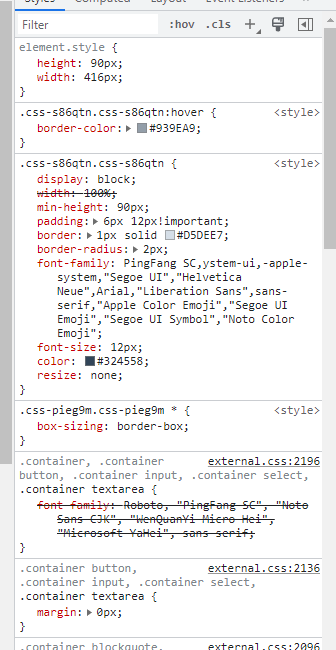
As shown above, @emotion/css generates two identical class names on the element. The resulting selector has specificity a=0 b=2 c=0 → 20, which is enough to beat the vast majority of host styles.